Before you start
- An Invozo account with your shop approved, under Shops.
- PHP 8.1 or newer, with cURL. No other library is needed.
- Your shop on a public address with https://, the same as the one in your Invozo account.
Steps
1
Put the folder on your server
- Open the zip and upload the folder
invozonext to your shop. - Copy
config.sample.phpasconfig.php.
2
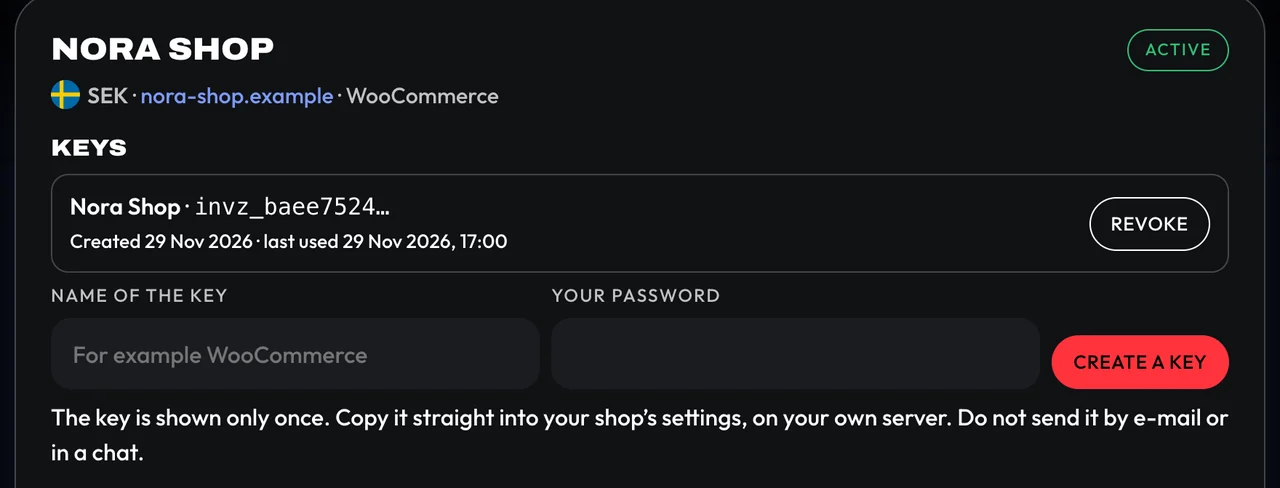
Create the key in Invozo
- Log in at invozo.eu/account and open Shops.
- In the card of your shop, write a name for the key and your password.
- Press Create a key and copy it. It is shown only once.
- Paste it only in your own shop. Do not send it by e-mail or in a chat.
3
Set the confirmations
- Paste the key in
config.php. - From the command line, in the folder:
php connect.php https://your-shop.com/invozo/webhook.php
- Put the secret it shows in
config.php, then run it again without the address. It has to say Webhook: works. php connect.php
4
Tie it to your orders
- In
orders.php, replace the functions with your own database. The names and what they return stay the same. - Delete
orders.jsonif it was created.
5
Put the button at checkout
- The buyer presses it and lands on the Invozo page:
<form method="post" action="/invozo/pay.php">
  <input type="hidden" name="order" value="1042">
  <button>Pay by card</button>
</form>
6
Check with a small order
- Pay an order of your own.
webhook.phphas to mark it as paid.
All done. Your shop takes payments through Invozo.
What the buyer sees
The secure Invozo page, in the buyer’s language, with the web address of your shop and the amount. The payment is processed by RoxPay.

Orders and refunds
- Paid:
webhook.phpchecks the signature, the amount and the currency, then callsmark_paid. - Different amount: it calls
mark_for_reviewinstead. - Another language than PHP: the page for your developer has Node and the calls for any language.
- Refunds are made by Invozo. Write to us, and the refund appears on the order.
If something does not work
Questions: hello@invozo.eu
+40 750 277 888