Before you start
- An Invozo account with your shop approved, under Shops.
- Any language that can send an HTTPS request from a server. The Node package needs Node 20, the PHP one PHP 8.1.
- Your shop on a public address with https://, the same as the one in your Invozo account.
Steps
1
Choose the language
- PHP: invozo-php.zip, then its own steps. Written: the payment, the confirmation and the check of the amount.
- Node: invozo-node.zip, with the steps in README.txt. No other package is needed.
- Another language: the calls below, and the whole Shop API.
2
Create the key in Invozo
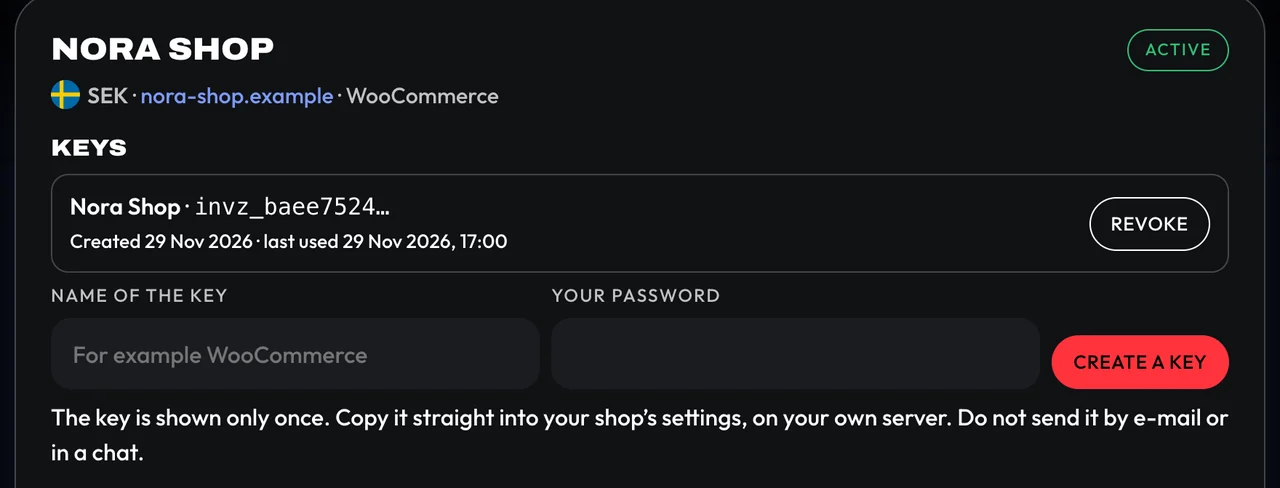
- Log in at invozo.eu/account and open Shops.
- In the card of your shop, write a name for the key and your password.
- Press Create a key and copy it. It is shown only once.
- Paste it only in your own shop. Do not send it by e-mail or in a chat.
3
Check the key
- It answers with the name of the shop, its currencies and limits:
curl https://invozo.eu/api/v1/ping -H "Authorization: Bearer invz_your_key"
4
Make a payment link
- From your server, when the order is placed. The amount is in cents:
curl -X POST https://invozo.eu/api/v1/payment-links \ -H "Authorization: Bearer invz_your_key" \ -H "Content-Type: application/json" \ -d '{"amount":4990,"currency":"EUR","order_id":"1042","description":"Order 1042","customer":{"name":"Ana Pop","email":"ana@example.com"},"return_url":"https://your-shop.com/thank-you"}'- Keep
referenceon the order and send the buyer tourl. - The same
order_idnever makes a second link.
5
Put it at the checkout
- If Invozo is your only payment method, show this right above the order button, without a list to choose from:
<input type="hidden" name="payment_method" value="invozo">
<img src="https://invozo.eu/img/insigna/invozo-mic-deschis.png" width="160" height="42" alt="Invozo">
<strong>Card payment</strong>
<small>You pay on the secure Invozo page. The payment is processed by RoxPay. On your card statement it shows as INVOZO/DKLGROUP.</small>
<button type="submit">Place order and pay</button>
- When the buyer presses the button: save the order as waiting for payment, make the link and send the buyer to
url, in the same window. - On the thank-you page ask for the state:
paidmeans thank you,openmeans a “Pay now” button to the sameurl. - The texts in ten languages and the whole code, in PHP and Node: Invozo at your checkout.
6
Receive the confirmation
- Register the address once. The answer has the signing secret, shown only then:
curl -X POST https://invozo.eu/api/v1/webhooks -H "Authorization: Bearer invz_your_key" -H "Content-Type: application/json" -d '{"url":"https://your-shop.com/invozo/webhook"}'- For every call, over the raw body:
sha256=HMAC_SHA256(secret, X-Invozo-Timestamp + "." + body) == X-Invozo-Signature
- Refuse calls older than 5 minutes. Compare the amount and the currency with the order, then mark it as paid.
7
Test it
- Ask Invozo for a test event. It has to say
"delivered": true: curl -X POST https://invozo.eu/api/v1/webhooks/test -H "Authorization: Bearer invz_your_key"
- Then pay a small order of your own.
All done. Your shop takes payments through Invozo.
What the buyer sees
The secure Invozo page, in the buyer’s language, with the web address of your shop and the amount. The payment is processed by RoxPay.

Orders and refunds
- Events:
payment.paid,payment.refundedandwebhook.test. The same event can come twice: check if the order is already paid. - No answer from you: Invozo tries again after 1 minute, 5 minutes, 30 minutes, 2, 6 and 24 hours.
- Not sure:
GET /payment-links?reference=…gives the state at any time. - Refunds are made by Invozo. Write to us, and the refund appears on the order.
If something does not work
Questions: hello@invozo.eu
+40 750 277 888